♟️ Kletka — Cross-Platform Chess Analyzer



Website: https://andreykhrypach.github.io/Kletka/
Kletka is a cross-platform chess analysis tool that supports PGN files, variations, annotations, and the Stockfish engine. It features a modern, customizable interface and is available for Windows, Linux, and macOS.
📝 Changelog
See CHANGELOG.md for a detailed history of changes.
🚀 Features
- 📁 Open, edit, and save PGN files
- 🧩 Full support for variations and annotations
- 📚 Polyglot opening books — load, browse, and edit opening variations
- 📤 Export game tree to Polyglot book — save your personal repertoire
- 🔍 Position analysis with Stockfish (UCI engine)
- 🎨 Customizable board themes
- 📋 Copy position as FEN + ASCII diagram (Ctrl+Shift+P)
- 🌍 Multilingual: English, Russian, Chinese
- 🖥️ Cross-platform: Windows, Linux, macOS
📺 Video Tutorials
Step-by-step guides on our YouTube channel:
Windows:
- Kletka tutorial: Windows installation
- Kletka tutorial: Windows — setting up Stockfish
- Kletka tutorial: How to use Polyglot opening books
Linux:
More tutorials coming soon — macOS.
📚 Opening Books (Polyglot)
Kletka supports Polyglot opening books (.bin files), allowing you to explore and study chess openings interactively — and to build your own repertoire.
How to use opening books:
- Go to Books → Load Book
- Select a Polyglot book file (
.bin) - Navigate through variations using the keyboard:
- ↑ / ↓ — move between variations
- → / Enter — select a variation
- ← — go back to the previous position
How to edit a book:
Kletka allows you to add moves directly to the loaded book:
- Play a move on the board — it's automatically added to the book
- Press Alt+Z — undo the last added move
- Use Books → Save Book (Ctrl+Shift+S) — apply changes to the
.binfile - Use Books → Clear Book (Ctrl+Shift+C) — unload the book
Export game tree to Polyglot book:
You can export your current analysis tree as a Polyglot book:
- Analyse or set up a position with variations
- Go to Books → Export to Polyglot Book…
- Choose a folder and filename — the book is created in
.binformat
All moves from the tree (main line + all variations) go into the book. Transpositions and duplicates are automatically deduplicated.
The resulting book can be loaded back into Kletka or used with Stockfish, Leela, ChessBase, Scid, Arena, and other compatible software.
System Requirements for Books
For opening book functionality, Kletka requires:
- Java 17 LTS (Liberica Full JDK recommended)
- JVM arguments (automatically applied when running from the launcher):
--add-opens java.base/sun.nio.ch=ALL-UNNAMED
--add-opens java.base/sun.misc=ALL-UNNAMED
Note: If you're running Kletka from the command line, use:
java --add-opens java.base/sun.nio.ch=ALL-UNNAMED \
--add-opens java.base/sun.misc=ALL-UNNAMED \
-jar Kletka.jar
These arguments are required for fast Polyglot book operations using memory-mapped files.
🔧 Technical Details: Memory-Mapped Files
Kletka uses memory-mapped files (MappedByteBuffer) for lightning-fast Polyglot book operations, even on HDD.
Important: Mapped byte buffer is not released by the JVM garbage collector while a reference exists. So that you can delete, move, or replace a book file while Kletka is running, the application explicitly calls:
sun.misc.Unsafe.invokeCleaner(mappedByteBuffer);This immediately releases the OS-level file lock.
What this means for you:
- ✅ You can safely delete and move the
.binfile after unloading the book - ✅ You can replace the book file with a new one
- ✅ No more "file is locked by another process" errors on Windows
Linux: Known Issues
On Debian Trixie / Ubuntu 24.04+ with Wayland, dialogs may not receive focus (keyboard works, mouse doesn't). This is a known JavaFX 17 + GTK 3 + Wayland bug.
Solution: already included in Kletka — the app runs with -Djdk.gtk.version=2, which uses GTK 2 via XWayland.
Recommended books:
For best results, we recommend using the uho-pohl.bin opening book, which contains extensive high-quality opening variations.
Where to get Polyglot books:
You can download free opening books from the official Polyglot books repository: 🔗 Polyglot Books Repository
Other popular sources:
- UHO-Pohl openings — high-quality opening database
- ChessTempo's Polyglot books
- Create your own using the Polyglot format
📋 Copy Position (FEN + ASCII)
You can copy the current position to the clipboard in a convenient format — FEN plus an ASCII diagram:
- Menu: Edit → Copy Position
- Shortcut: Ctrl+Shift+P
This is useful for:
- Sharing positions in chats, forums, or issue trackers
- Analyzing positions with AI assistants
- Documenting positions in text files
The output includes the FEN on the first line and an ASCII diagram below it, wrapped in a Markdown code block for easy pasting.
🐛 Known Issues on macOS
Drag-and-drop: piece is grabbed by the corner
Symptoms:
- A piece is visually grabbed by the corner instead of the center.
- To make a move, you need to drag the mouse to the corner of the target square.
- After dropping, the cursor may disappear until the mouse enters the menu area.
Cause: Known JavaFX bug JDK-8333919 — dragViewOffsetX/Y are ignored on macOS.
Fix: Fixed in JavaFX 23 (requires JDK 21+). Kletka currently uses Java 17 + JavaFX 17.
Workaround:
- Use click-to-move (click on a piece → click on a square) instead of drag-and-drop.
- Or wait for Kletka to migrate to JDK 25 + JavaFX 25 (planned in future releases).
Status: Tracked in issue #XXX. Will be fixed when we migrate to the new stack.
🖥️ Screenshots
Quick Preview
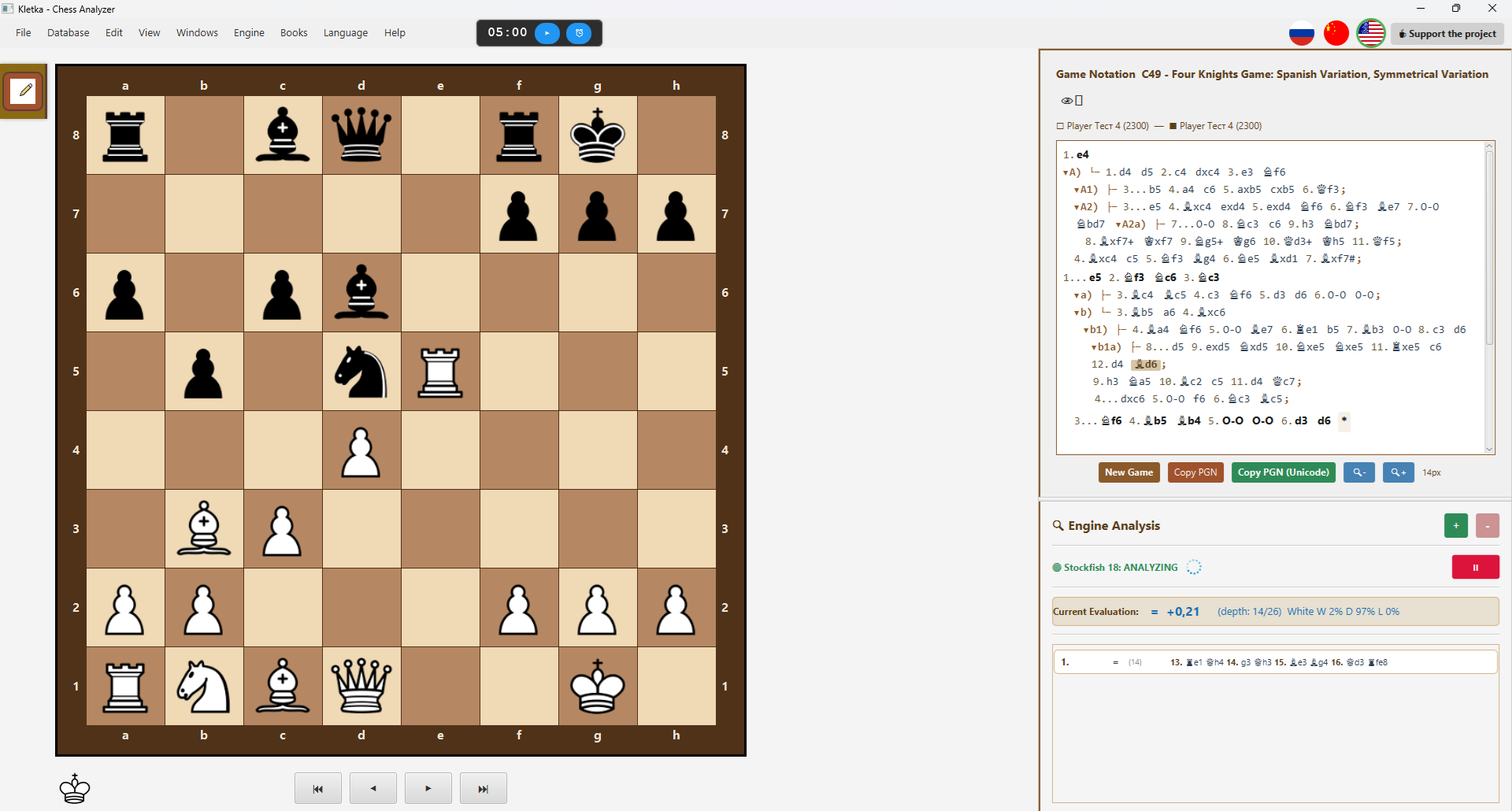 |
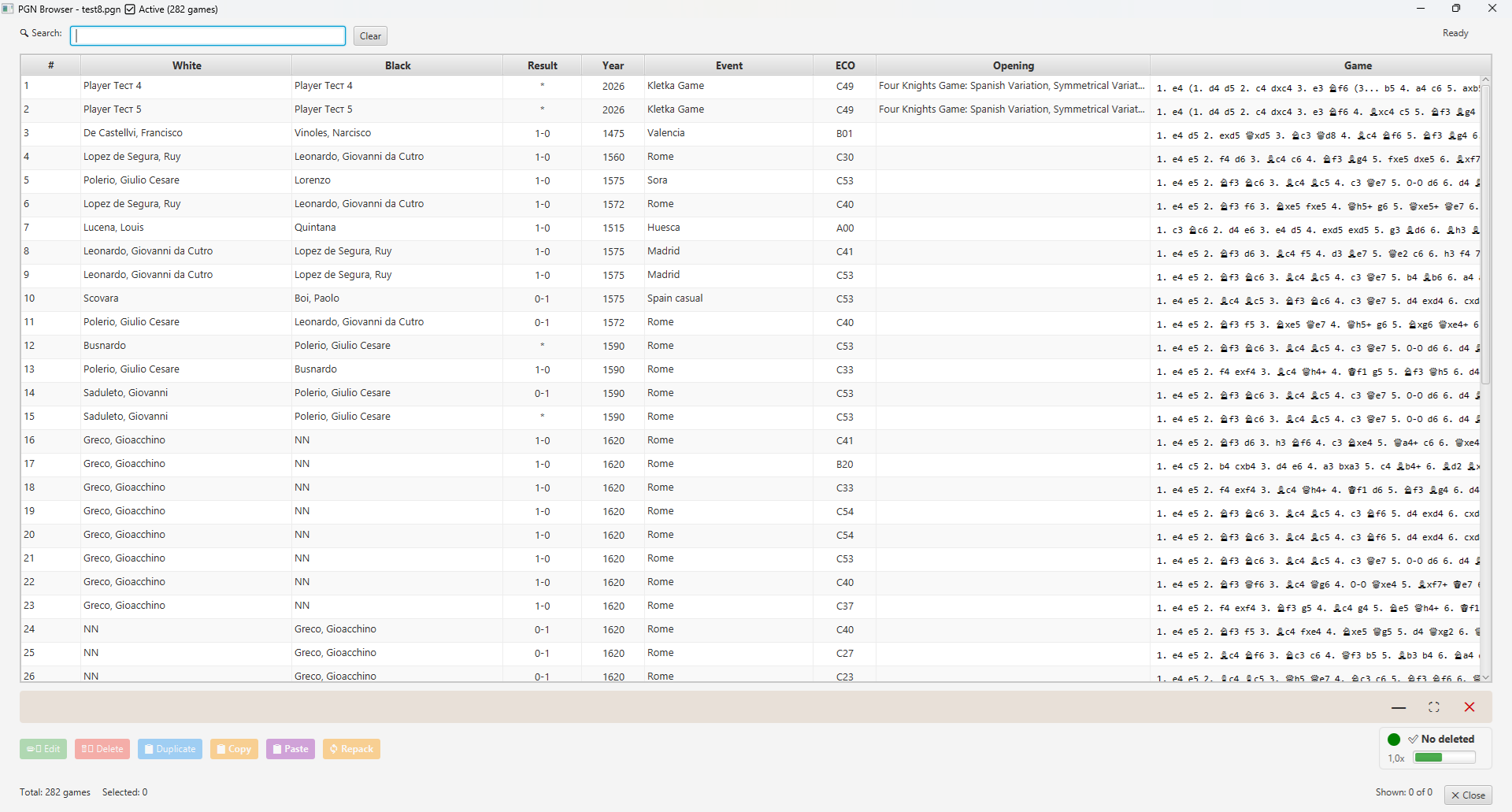 |
| Main interface | PGN browser |
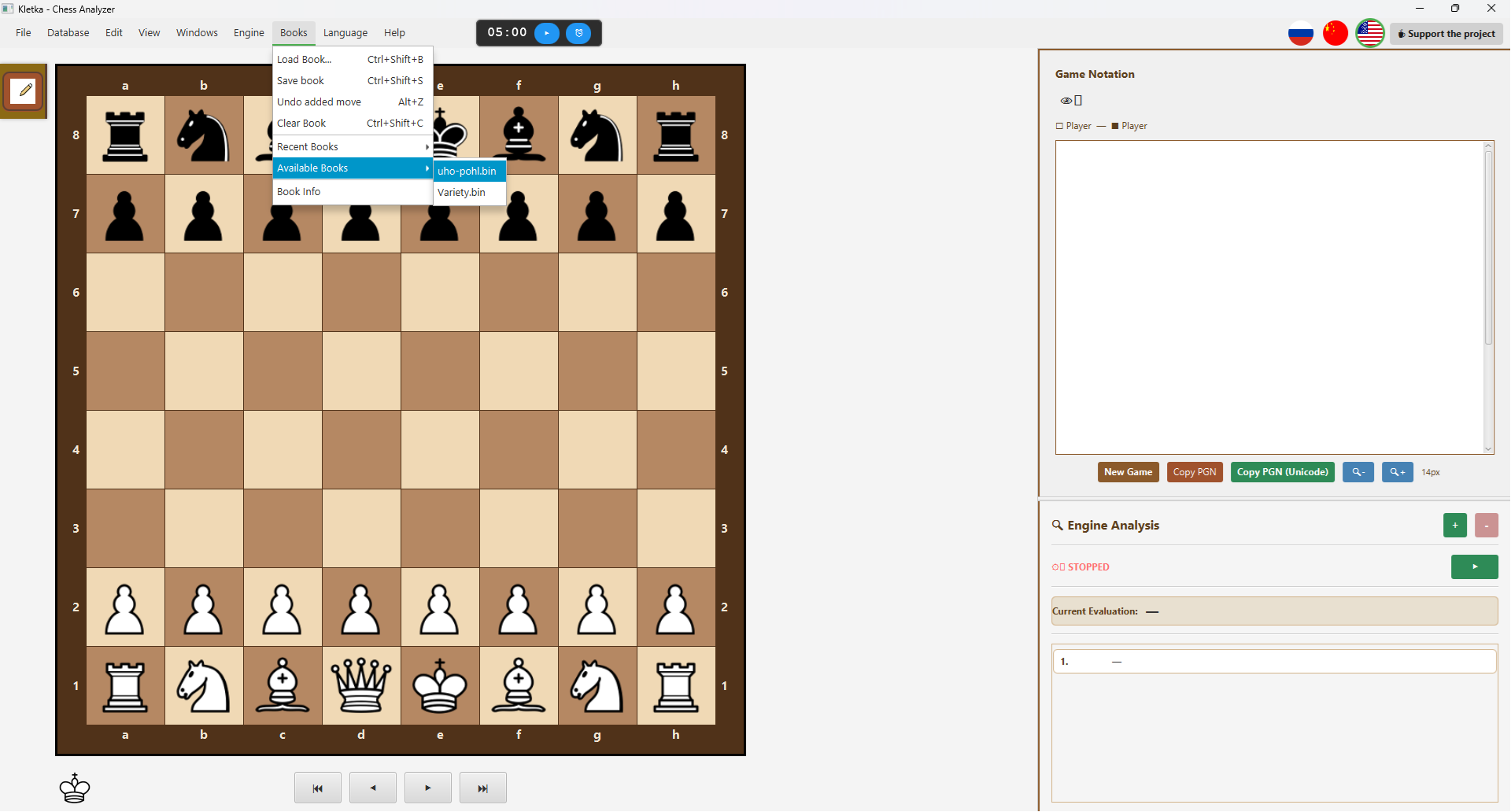 |
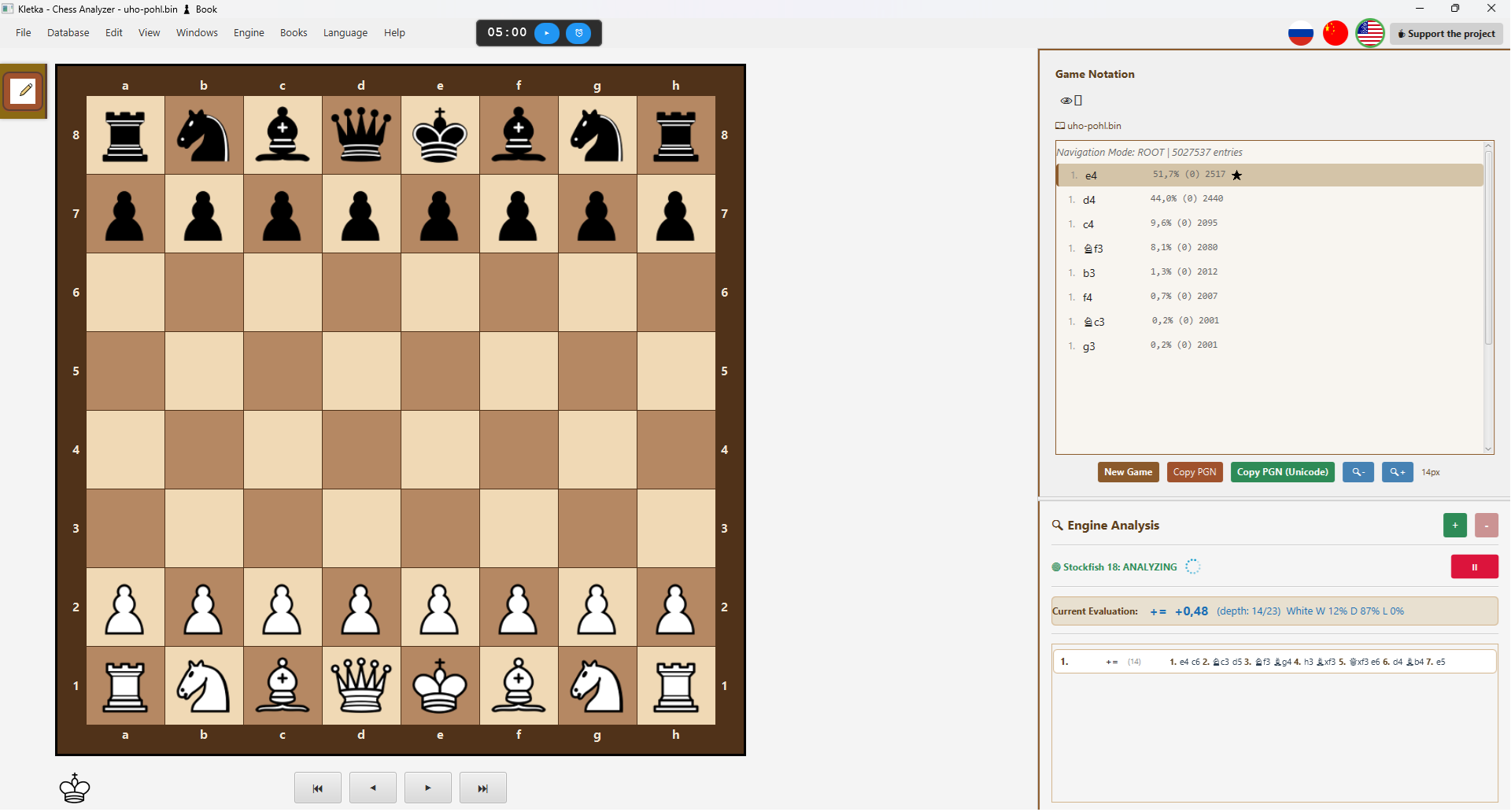 |
| Open Polyglot Book | Polyglot Book Loaded |
Full Size
Click on an image to open it in full size in a new tab.
📦 Installation
Windows
Download Kletka.exe from the Releases page and run the installer.
macOS
Download Kletka.dmg, open it, and drag Kletka.app to the Applications folder.
Linux (Debian/Ubuntu)
sudo dpkg -i kletka*.deb🛠️ Building from Source
Prerequisites
- Java 17 (Liberica Full JDK recommended) — download from BellSoft
- Maven — install via
brew install maven(macOS) orsudo apt install maven(Linux)
Important JVM Arguments for Development
When running from your IDE, add these VM options:
--add-opens java.base/sun.nio.ch=ALL-UNNAMED
--add-opens java.base/sun.misc=ALL-UNNAMED
This ensures full Polyglot book support during development.
git clone https://github.com/AndreyKhrypach/Kletka.git
cd Kletka
mvn clean package
Platform-specific builds
# Windows
mvn clean package -P windows

# Linux
mvn clean package -P linux

# macOS
mvn clean package -P mac
🧠 Setting up Stockfish
Kletka uses the Stockfish UCI engine for analysis. You need to install it separately:
Windows
- Download Stockfish from the official website: https://stockfishchess.org/download/
- Extract the archive
- In Kletka, go to Engine → Configure Engine and select the
stockfish.exefile
Linux (Debian/Ubuntu)
sudo apt install stockfishThen in Kletka, go to Engine → Configure Engine and select the stockfish binary.
macOS
brew install stockfishThen in Kletka, go to Engine → Configure Engine and select the stockfish binary.
📄 License
This project is licensed under the GNU General Public License v3.0. See the LICENSE file for details.
👨💻 Author
Andrey Khrypach
⭐ Support
If you like this project, please ⭐ it on GitHub!